Record and annotate your screen with this utility
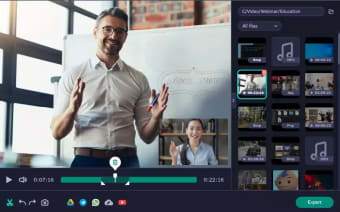
Movavi Screen Recorder is a robust tool that grants users the ability to record their desktop screens. While its ultimate goal is pretty straightforward, this powerful utility program offers flexibility and a number of advanced features, making it ideal for different recording needs—whether it’s for keeping track of lectures and webinars or for filming educational content and presentations.
Movavi Screen Recorder presents users with a free 7-day trial, which grants them access to all the app’s features—though, videos will showcase an unremovable watermark. Following the trial period, users can obtain either a yearly subscription or a lifetime license.
No-fuss recording process
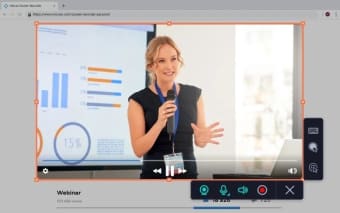
Movavi Screen Recorder's straightforward interface is one of its most appealing aspects. The process of recording your screen is as simple as clicking the Screen recording icon, selecting the desired area, and pressing “Rec” to start recording. Once done, a click on “Stop” completes the process. This simplicity is especially beneficial for users who prefer software that doesn't require extensive training or reading through numerous guides.
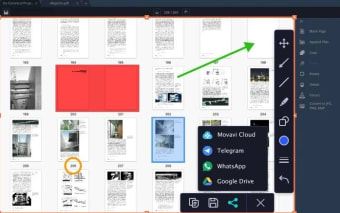
The app is also packed with features that add significant value to the recording experience. The ability to draw on recorded videos allows users to add pointers and shapes in real time, which is excellent for highlighting important elements during a presentation or tutorial. This ensures that viewers' attention is directed to key parts of the screen, enhancing the overall effectiveness of the video.
Ensure high-quality audio
For meetings and webinars, the software provides users with the ability to schedule their recordings so they don't have to worry about accidentally forgetting to capture any important details. The software's ability to capture scrolling screenshots is another noteworthy feature. Instead of taking multiple screenshots to cover long web pages or documents, you can now capture the entirety of a page’s content in one go.
Audio clarity is crucial for any screen recording, and Movavi Screen Recorder excels in this area. The software captures system sounds and microphone input with remarkable clarity. The newly-introduced noise reduction feature further enhances audio quality by filtering out background noise. It is important to note, though, that it is not optimized for game recording. However, Movavi offers an alternative called Gecata by Movavi—specifically designed for recording gameplay or for streaming in real-time.
A user-friendly solution
Overall, Movavi Screen Recorder is a powerful and easy-to-use tool that significantly enhances productivity and efficiency in screen recording tasks. Its user-friendly design—coupled with advanced features like scrolling screenshots, real-time drawing, and noise reduction—makes it an excellent choice for professionals and casual users alike. Despite its limitations with game recording, the software's strengths make it a top contender for anyone needing a reliable screen recording solution.